Orchestrate
a
fleet
of
AI
coding
agents.
One web UI. Multiple workspaces. Parallel execution.
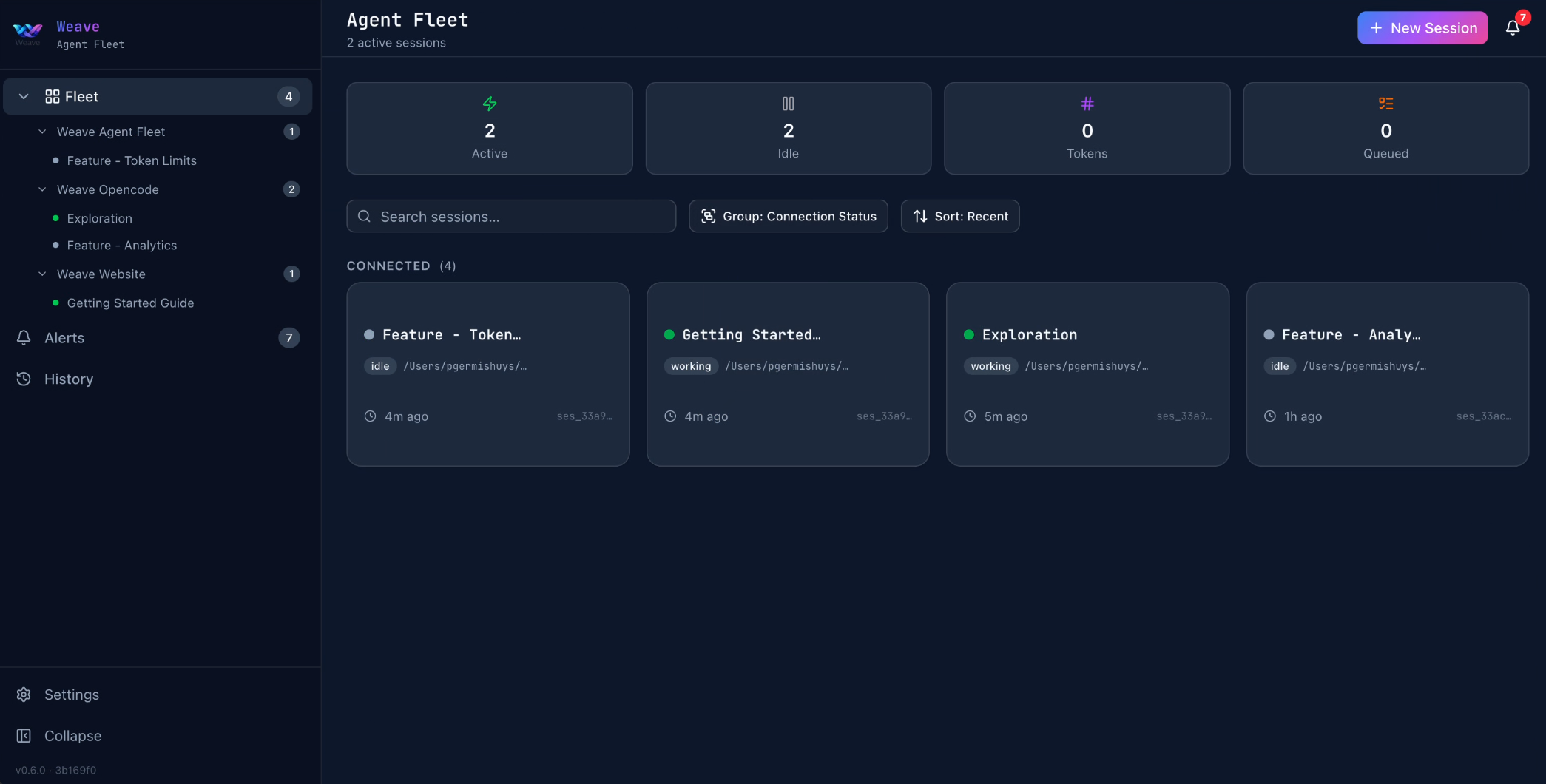
Spawn, monitor, and interact with multiple OpenCode sessions from a single browser tab. Each agent works independently — different repos, different tasks, zero context collision.
Install in One Command
curl -fsSL https://get.tryweave.io/agent-fleet.sh | sh
Then run:
weave-fleet
Managing your installation
-
weave-fleet update— Update to the latest version -
weave-fleet version— Check installed version -
weave-fleet uninstall— Remove Fleet
Requires OpenCode CLI · Full setup guide
Features
Everything you need to run a fleet of AI coding agents
Multi-Session Management
Spawn and monitor multiple OpenCode sessions. Each runs in its own workspace with independent context.
Web Dashboard
Real-time web UI on localhost:3000. See all sessions, their status, diffs, and event streams at a glance.
Workspace Isolation
Each agent session gets its own workspace. No context bleeding between tasks. True parallel development.
Session Controls
Create, prompt, abort, and inspect sessions. Send follow-up prompts. View generated diffs inline.
One-Command Install
Single curl or PowerShell command. Self-contained binary with bundled Node.js. No dependency management.
Auto-Updates
Run weave-fleet update to pull the latest version. Always current, zero friction.
Cross-Platform
macOS, Linux, and Windows. Same experience everywhere.
SQLite Persistence
Session state persisted to ~/.weave/fleet.db. Restart without losing context.
How It Works
From install to orchestration in under a minute
Setup
Install
Run the one-liner for your platform. The installer downloads the self-contained bundle — including a Node.js runtime — and creates the weave-fleet command.
Start
Launch
Run weave-fleet and open localhost:3000. The dashboard shows your workspace and lets you create new agent sessions.
Use
Orchestrate
Spawn agents across repos. Monitor progress, view diffs, send prompts — all from one tab. Agents work in parallel, each in isolation.
Unlock Agent-Driven Orchestration
Fleet isn't just a dashboard for you to manage sessions. Install the fleet-orchestration skill, and your agents manage sessions themselves.
Autonomous Parallelization
Agents analyze task overlap and decide whether to parallelize or serialize — before spawning any children. No manual coordination needed.
Agents Spawn Agents
A parent agent creates child sessions, assigns scoped tasks, and sets file boundaries — each child works in its own isolated worktree.
Callback-Driven Workflow
No polling. When a child finishes, Fleet sends a callback to the parent with a summary of files changed and final status. The parent inspects results and moves on.
Automatic Conflict Detection
After parallel children complete, the parent reviews all diffs for overlapping file changes and flags conflicts before reporting success.
Error Recovery
Failed child sessions are automatically inspected. The parent can retry with clarified instructions or escalate to the user for guidance.
One Skill Install Away
Install the fleet-orchestration skill from Settings, assign it to Loom and Tapestry, and your agents gain the ability to orchestrate multi-session workflows.
Fleet + Weave
Two products. Complementary. Independent.
Fleet works with plain OpenCode
Fleet manages multiple OpenCode sessions — no plugins required. Each session runs standard OpenCode. The Weave plugin is completely optional.
Weave enhances each session
If you DO install Weave, each Fleet session gets Weave's structured Plan → Review → Execute → Audit workflow with automatic code quality and security gates. Fleet manages the sessions; Weave enhances what happens inside them.
Different layers of orchestration
Fleet = multi-session management (across repos, parallel tasks). Weave = multi-agent orchestration (within a single session). They complement each other but are fully independent.
Configuration
Configure via environment variables — sensible defaults out of the box
| Variable | Default | Description |
|---|---|---|
PORT |
3000 |
Server port |
WEAVE_HOSTNAME |
0.0.0.0 |
Server bind address |
WEAVE_DB_PATH |
~/.weave/fleet.db |
SQLite database path |
WEAVE_INSTALL_DIR |
~/.weave/fleet |
Installation directory |
Frequently Asked Questions
Do I need the Weave plugin?
No. Fleet works with plain OpenCode — no plugins required. If you install Weave, each session gets enhanced multi-agent orchestration, but it's entirely optional.
How many sessions can I run?
Limited by system resources. Each session runs an OpenCode server process. On a typical dev machine, 5–10 concurrent sessions is comfortable. Monitor memory and CPU usage.
Is Fleet free?
Yes. MIT licensed, open source, free forever. You pay only for the AI model API calls each session makes.
Is my data stored locally?
Yes. All state is persisted to SQLite at ~/.weave/fleet.db. Nothing leaves your machine. No telemetry, no external APIs.
What platforms are supported?
macOS, Linux, and Windows. Fleet ships as a self-contained bundle with its own Node.js runtime — no system dependencies beyond OpenCode.